&w=3840&q=80)

In this article we’ll explore how to separate the back end from the front end through decoupling. First we’ll go over the key concepts, and then I’ll present monolithic and decoupled architecture, as well as practical steps for decoupling and practical experience from a real-life project.
Concepts
A web application is a digital service which enables shopping, viewing of content or communicating through the browser. Each application is composed of two parts: the front end and the back end. The front end is the visible part of the app and shows users buttons, images, the application design, etc.; while the back end is kind of like an engine that processes requests.
So, we can picture monolithic architecture as a huge stone block – a monolith. Everything is tightly joined together; if a single part starts to break, that impacts the entire structure. It’s the same with a monolithic application: a change in one element can cause issues in the entire system.
In contrast, decoupled architecture is like building with modular blocks. Elements are interconnected, but each stands on its own foundation. If issues are encountered in a module, that doesn’t affect any other modules. Despite this independence, all of the parts function together.
Monolithic architecture
Monolithic architecture means that the front end and the back end are tightly coupled in one system. They use the same database and server, and different parts of the application are strongly dependent on one another.
The main issue with this approach is that a failure of one element can cause a chain reaction which affects the entire application. That may lead to complicated upgrades, as well as costly and time-consuming maintenance. Despite these challenges, monolithic architecture is still a common choice for smaller projects.
Advantages and disadvantages of monolithic architecture
The main benefit of monolithic architecture is faster implementation of changes in the first phase of development, since the base can be quickly set up. Debugging is also easier since the entire system is unified, which makes it easier to track changes.
Additionally, the early financial burdens are significantly reduced since a monolith doesn’t require a complex infrastructure or a tool to manage servers and services, which means lower costs and lower technical complexity.
Project management is also easier since it’s more straightforward to manage versions and maintain documentation which is hugely convenient for smaller teams. All of these benefits lead to monolithic architecture remaining a very popular choice for beginner projects where speed and simplicity are key.
Still, there are some noteworthy disadvantages of monolithic architecture. For example, if you update a registration form, the export of data can get corrupted. It’s important to restrict concurrent work of back end and front end teams, since the back end can fall behind.
Updates are stressful and time consuming, which leads to downtime, i.e. the site or application not being accessible during updates.
Lastly, it’s also very difficult to implement new technologies into a monolithic architecture – imagine, for example, having to change your electricity provider when you get a new TV.
Despite its disadvantages, it bears repeating that the monolith is a good choice. However, as the application grows in complexity, this type of architecture represents an obstacle to growth.
Decoupled architecture
Decoupled architecture means that the front end (what the user sees) and the back end (what functions in the background) function independently of each other; they are only connected through clearly defined interfaces (i.e. APIs such as REST and GraphQL).
The main benefit of this approach is that teams can develop and update each part of an application independently, without impacting the entire system. This also allows for more flexibility – for example, the front end can use React while the back end runs on PHP without any issues.
Moreover, decoupled architecture is often based around microservices, where every major functionality (e.g. orders, payments, users) is a separate service with its own API. This improves maintainability, and facilitates testing and scaling of the system.
Despite its benefits, decoupled architecture requires more upfront planning, since communication protocols need to be clearly defined and all components need to function in tandem.
Advantages of decoupled architecture
- Flexibility: The front end can use different technologies (React, Vue, mobile apps) without changes on the back end.
- Independence of teams: Front end and back end teams can work separately and parallelly.
- Scalability: It’s easier to adapt to growth and traffic – for example, it’s possible to only scale the back end.
- Greater reuse: A single back end can use multiple different front ends (website, mobile app, etc.)
- Faster development: Decoupled teams can implement changes while developing, which speeds up time to market.
- Improved security: The back end can remain hidden behind the API layer, which improves oversight of access to and protection of data.
- Easier upgrades: Changes to the front end or the back end can be implemented independently, without disrupting the entire system.
- Improved user experience: The front end can be optimized separately for different devices and use cases, resulting in applications that are more tailored and more responsive.
Disadvantages of decoupled architecture
Even though there are numerous advantages to decoupled architecture, it also brings a few challenges that need to be addressed:
1. Greater complexity
The system is composed of several components (front end, back end, APIs, microservices), which requires more configuration and coordination.
Example: If you’re using microservices, you need to manage multiple servers, databases and communication streams.
- More complex debugging – errors can occur in any of the components.
- More demanding testing – all interfaces require integrated tests.
2. Greater use of resources
Problem:
- Each component (front end, back end, API gateway) requires its own servers and infrastructure.
- Example: If your front end (React) and back end (Node.js) are decoupled, you need to maintain two servers instead of a single server.
3. Latency in communication
Problem:
- Since components communicate through the network (API calls), there may be lags in the responsiveness.
- Example: If the API server is slow to respond, the user interface gets “hung”.
Consequence:
- Poorer user experience (without proper optimization).
- The need to cache and optimize API calls.
4. Issues with data consistency
Problem:
- If there are several independent services, there may be changes in the data.
- Example: The front end shows a particular product as “in stock”, but it’s no longer available on the back end.
Solution:
- The use of synchronization mechanisms (e.g. event-based management – Kafka, RabbitMQ).
5. Greater dependence on APIs
Problem:
- If APIs are not properly documented or are unstable, there may be interruptions to the work.
- Example: If the back end changes the structure of a response, the front end may get corrupted.
Consequence:
- Strong communication standards are required (OpenAPI, GraphQL schemas).
- API versioning to prevent breaking changes.
6. More difficult development for smaller teams
Problem:
- Decoupled architecture requires more specialized skills (front end, back end, DevOps).
Consequence:
- Greater beginner hurdle – smaller projects may not be worth decoupling.
Practical steps
In this section, we’ll look at practical steps of decoupled architecture. The first step is planning the business goals of decoupling the front end and the back end; the main goal is typically improving the user experience, or improving development agility.
It’s important to identify the most critical points of a monolith, which are deployments, performance and unstructured code. It’s also essential to have clear and detailed documentation of all functionality, such as modules, dependencies and external APIs.
It’s best to start with a small, but not critical feature, and expose it through an API. Next, you need to identify functional units where logical modules can be extracted (e.g. users, orders, payments). Domain driven design can be very helpful in determining the scoping.
Of course, you also need to implement API interfaces, which need to be clearly defined, planned and compatible with older versions. Swagger is a very useful tool for documenting APIs.
Lastly, you need up-to-date testing as you gradually transition from monolithic to decoupled architecture. In my personal view, versioning, monitoring and continuous development / continuous integration need to be the standard.
DDD – Domain-Driven Design
Domain-Driven Design (DDD) is a software development approach which prioritizes the business domain together with domain experts. The goal is to have the software solution directly reflect the complexity and practices of the actual business environment.
DDD helps separate the system into clearly defined contexts, which facilitates decisions about which parts of an application are worth decoupling. This enables greater focus, less independence between modules, and more efficient coordination between teams. DDD is composed of entities, value objects, aggregates, repositories, and business logic.
DDD improves the coordination between the business requirements and the code. It separates the system into independent parts, makes it easier to make changes to the system, and significantly facilitates communication between business and technical teams.
Results and experience from a real-life product
Now I’m going to present the architecture of a product that I’ve been working on. It’s a decoupled setup using Drupal for the back end, Next.js and React for the front end, and GraphQL for the API interface. Caching is taken care of by Varnish, Redis and Drupal Cache, while Solr is used for highly efficient searching.
Drupal
Drupal is an open source content management system (CMS), designed for the creation of complex and secure websites. It is a very flexible and scalable platform, making it a common choice for web portals, intranets, large corporate sites, government sites and universities.
It can be extended with modules, which can be either core, contributed or custom modules. It supports SEO best practices, multilingual systems and different APIs. It enables flexible data modeling (e.g. through content types and taxonomies), while regular security updates make sure that it is stable and secure.
Drupal provides a user-friendly interface for editors, who are able to build pages without any code; it enables the creation of new content types, connections between entities, different displays of data, and lists (the Views and Display Suite modules are particularly relevant here). Another strength of Drupal’s is the management of roles and permissions for different users.
Built on PHP and the Symfony framework, Drupal is a classic monolith which enables a smooth transition to a decoupled system. It’s ideal for projects with a simple implementation and gradul transition to a decoupled architecture. It also has its own caching system and support for configuration management – all configuration can be exported in a YAML file and put on Git.
Another important functionality that Drupal offers is installation profiles. These provide predefined configuration for easier replication of environments. So, if you have a product, you have all the dependencies and configuration in an installation profile; upon installing Drupal, you can select that particular installation profile and have the whole product set up in a matter of minutes.
GraphQL
As already mentioned, the product uses GraphQL as the API layer between the front end and Drupal. GraphQL is a query language used for easier data retrieval. It was developed by Facebook in 2012 and made publicly available in 2015.
The main feature of GraphQL is that it only has a single endpoint for retrieving data (as opposed to REST, for example, which has multiple endpoints). This is enabled by the schema, which contains content type definitions, relations between entities, and read and write operations.
The schema allows us to clearly define which data appears in the response; this means that the client asks exactly what is needed and nothing else. It’s also possible to predict the result of a response. GraphQL thus gives us complete control over the data.
GraphQL uses the SDL (Schema Definition Language), which includes basic content types (INT, Float, String, Boolean, ID), as well as ENUM, Interface, Union and arrays. It’s also possible to create custom content types (such as date). Content types can be marked as non-null by adding an exclamation mark. Other features of SDL are mutations and queries, which allow us to retrieve and/or change data.
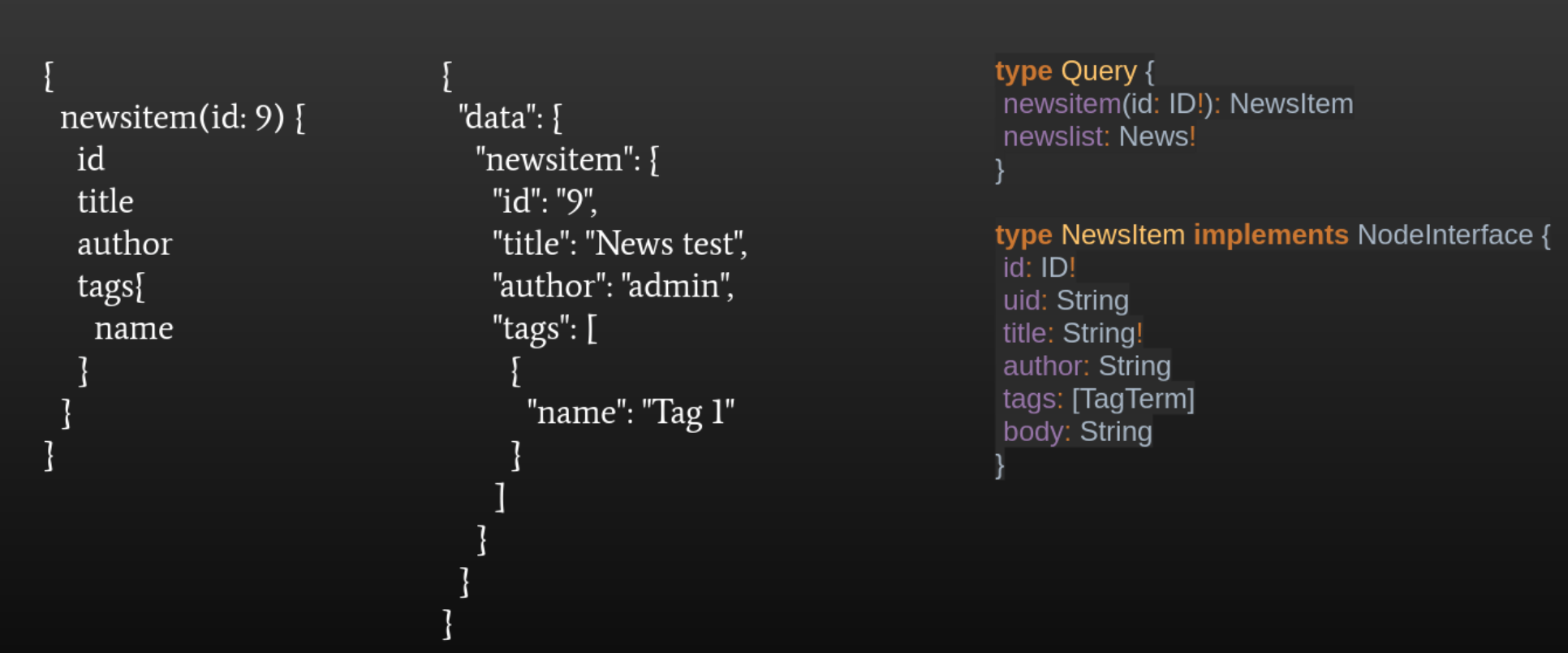
Let’s take a look at a practical example of creating types and making queries in GraphQL. All query operations in the schema are defined in the type Query with the method newsitem; it receives the ID argument, which is required because of the exclamation mark, and ensures that the result is a strongly typed newsItem. The next step is to cleanly define the NewsItem type, which contains the fields ID, UID, title, author, tags and body.
Once we run the query, we get the result in JSON format. JSON returns the specifically defined data that we wanted to retrieve. On the far left, we can see the JSON which is sent from the front end to the back end; in the middle, we can see what kind of response the front end will receive from the back end. The front end allows for custom selection of which fields we need the response to include.
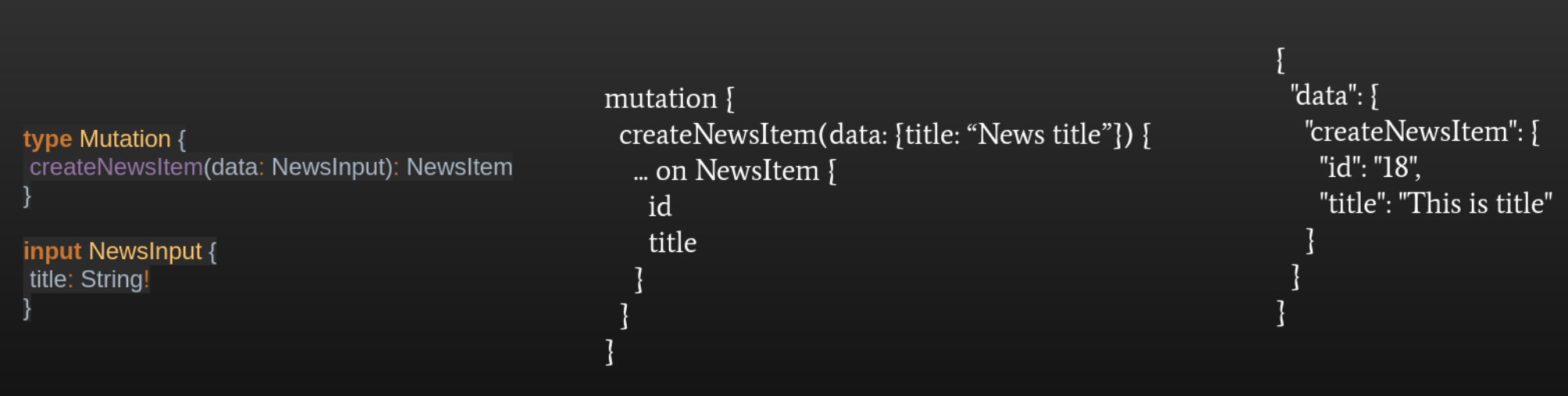
There are also mutations, which are intended for storing and updating data; all of these operations can be run under the Mutation type in the schema. Again, we define what data will be sent to the back end, with the input type newsInput, which has the title as a required field. In the Mutation type, we define the name of the function that receives this newsInput. In the middle we can see an example of what the JSON is displayed on the front end, and on the right we can see what the result is.
React & Next.js
As I already mentiond, this project uses React and Next.js on the front end. React is a JavaScript library for building custom user interfaces, with a focus on reusable components. It uses the virtual DOM for better performance, provides state management, and it has active community support and a rich tooling ecosystem.
Next.js is a framework based on React which supports server-side rendering and static site generation. It enables dynamic routes and API routes, as well as page refresh without rebuilding the entire page. It’s an ideal framework for decoupled architectures with back end systems such as Drupal.
In conclusion, let’s take a look at how a request goes from the browser to MySQL and vice-versa. First the user triggers an action on the browser (e.g. views a product), then Varnish checks if the response for this URL already exists in the cache. On the right, we can see what a “hit” or a “miss” typically look like in the header of the request. If we get a hit, Varnish cache was successful and the page loads very quickly, i.e. in a few milliseconds.
If we get a miss, we move on to Next.js, where the request is sent to GraphQL through server side rendering. GraphQL then checks if the result is in the Redish cache; if it isn’t, we move on to the Drupal back end to check if the result is in the internal Drupal cache. If it isn’t, a MySQL query is then made to the database.
In the other direction the process looks like this: the data is sent from MySQL to Drupal, where cache tags are set, then from Drupal to the GraphQL module, where cache tags are set again for a particular query. Next.js then returns the GraphQL response, rendering the page on the browser with all the React components. At the same time, the HTML response is stored in Varnish. Here the key points are:
- Varnish is a wise investment since it caches HTML or even API responses; it should be noted that this is true for get methods (queries).
- Redis is an in-memory key-value database used for storing fragmented data, such as GraphQL queries and Drupal entity cache.
- The Drupal caching system provides several layers, including:
- Render cache – for storing rendered elements such as blocks, views, etc.
- Dynamic page cache – for faster loading of dynamic content.
- Cache tags – for invalidating related content.
- Contexts – for adjusting the cache depending on circumstances (e.g. language, user role).
- Cache max-age – for determining how long cached data remains valid before it needs to be refreshed.
- MySQL is the last instance in case no cache contains the data.
Wrapping up
Decoupled architecture allows front end and back end teams to work separately, offering greater flexibility while increasing the agility of the development process. The most common reasons for decoupling are improved user experience, easier updates and better long-term scalability.